View & Manage Sample Slots
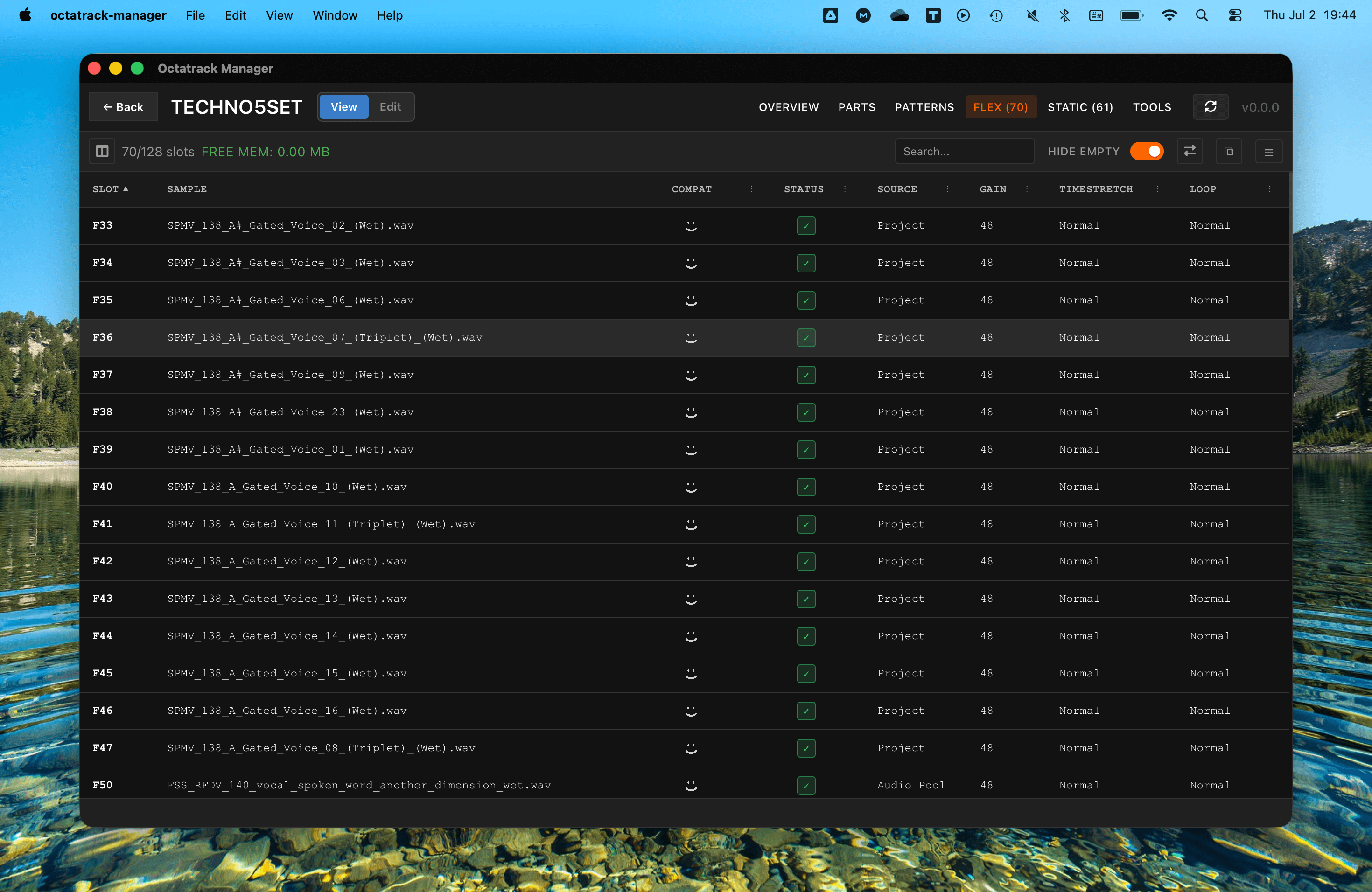
The Sample Slots tabs (Flex and Static) allow you to browse and manage the 256 samples assigned to your project. This is a powerful view for finding specific sounds and understanding how your project's samples are organized.
In View mode the table is read-only. Switch to Edit mode (the toggle in the project header, or press E) to assign new samples to slots, clear assignments or reset slot attributes. See Assigning & Managing Samples below.
Static vs. Flex Slots
The Octatrack manages memory in two distinct ways:
- Static Slots (128): Samples are streamed directly from the CF card. Generaly used for long recordings, backing tracks, or large sample libraries.
- Flex Slots (128): Samples are loaded into the Octatrack's RAM. Generaly used for real-time manipulation, slicing, and intensive sound design.
Flex RAM Capacity
The Flex sample slots table displays the available Flex RAM in the toolbar (e.g., FREE MEM: 57.4 MB). This reproduces the exact behavior of the Octatrack's free memory indicator displayed in its Flex Sample Slot list menu.
The total Octatrack RAM is 85.5 MB. The available capacity for Flex samples depends on:
- Reserved Recorder Buffers: Each recorder reserves
length × 44100 × 2 channels × bytes_per_samplebytes. The byte depth is 2 for 16-bit recording or 3 for 24-bit recording. - Loaded Flex samples: The PCM data size of every sample currently assigned to a Flex slot is subtracted from available RAM.
The value is displayed with 1 decimal place (for values ≥ 10 MB) or 2 decimal places (for values < 10 MB), using floor truncation (same as Octatrack).

Exploring the Table
Every row in the table represents a slot (S1–S128 or F1–F128). The table provides several pieces of information:
| Column | What it shows |
|---|---|
| Slot | The slot number (prefixed with "S" for Static or "F" for Flex). |
| Name | The filename of the sample. Hover on it to display the full file path - relative to project's folder. |
| Compatibility | Whether or not the audio file is compatible with Octatrack's audio engine. Uses same icons as on Octatrack. |
| Status | Whether or not the audio file is found at the exact location set for Sample Slot. |
| Usage | If and where the slot is used across the project. See Slot Usage below. |
| Source | Whether the audio file is located in Project's directory or the Set's Audio pool. |
| Gain | The gain setting for that sample slot. |
| Timestretch | Shows the timestretch mode (Off, Normal, Beat). |
| Loop | Shows whether the sample is set to loop (Off, Normal). |


Filtering and Sorting
Each column cna be sorted or filtered:
- Filter: Click on the 3 dots menu in column header to filter the slots form existing values.
- Sort: Click on any column header to sort the slots by name, path, gain, etc.

Additionally, you can also use these advanced features:
- Hide Empty: Toggle the switch to focus only on slots that have a sample assigned.
- Search: Type a name to filter the list instantly.


Slot Usage
The Usage column tells you at a glance whether a slot matters to the project, with up to two badges:
- A blue ✓ N badge counts the places where the slot audibly plays:
- Track machines that actually have trigs
- Sample locks on pattern steps
- A gray ○ N badge counts silent references:
- Machine assignments on tracks that never trig
- Slots referenced by patterns whose bank contains no trigg at all are ommited (to avoid false positives from default project's assignements)
Click a badge to see the exact locations:
- Machine assignments read Bank A · Part 1 · T1 · Machine.
- Sample locks read Bank B · Pattern 5 · T3 · Step 12 · Lock.
The column can be filtered by values: Used (plays), "Referenced, not triggered" and "Unused".
Column Preferences
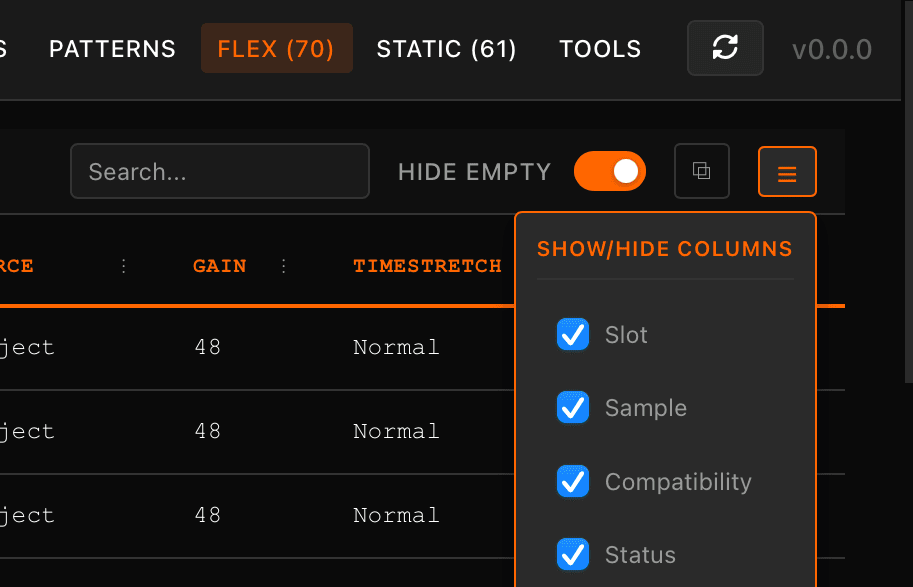
You can customize which columns are visible. Click the column menu icon in the toolbar to toggle column visibility. These preferences are remembered across sessions.
Playback
An audio player is available the bottom of the page. Select an item from either the sample slots or the Audio Pool pane to play it:
- Double-click a slot or a pool file to play it right away. You can also right-click it and choose Play.
- Use ↑ / ↓ to move to the previous / next slot and play it as you go.
- Press Space to play / pause the loaded sample.
- Hold Ctrl and press ← / → to scrub backward / forward the timeline; or drag the play head to any position.
- Drag VOL up/down to change volume. You can also scroll over it, or hold Ctrl and press ↑ / ↓.
- Click LOOP or use Shift + L to toggle sample repeat.
- Click AUTO or use Shift + Enter) to toggle auto playback when selecting a slot or file.

With the Audio Pool pane open:

Common audio formats are supported: WAV, AIFF, FLAC, MP3, OGG/Opus, and M4A/AAC.
The player is also available from Audio Pool.
Assigning & Managing Samples
All slot-editing actions require Edit mode (toggle in the project header, or press E). In View mode the same controls are visible but disabled, with a tooltip reminding you to switch to Edit mode.
Whenever you enter Edit mode, Octatrack Manager first backs up the project files it is about to modify.

The Audio Pool pane
When a project belongs to a Set that has an AUDIO/ pool, an Audio Pool toggle icon appears in the slot table toolbar (top left corner). Click it - or press A - to open the Audio Pool pane. From there you can drag samples straight from your pool onto slots without leaving the project.
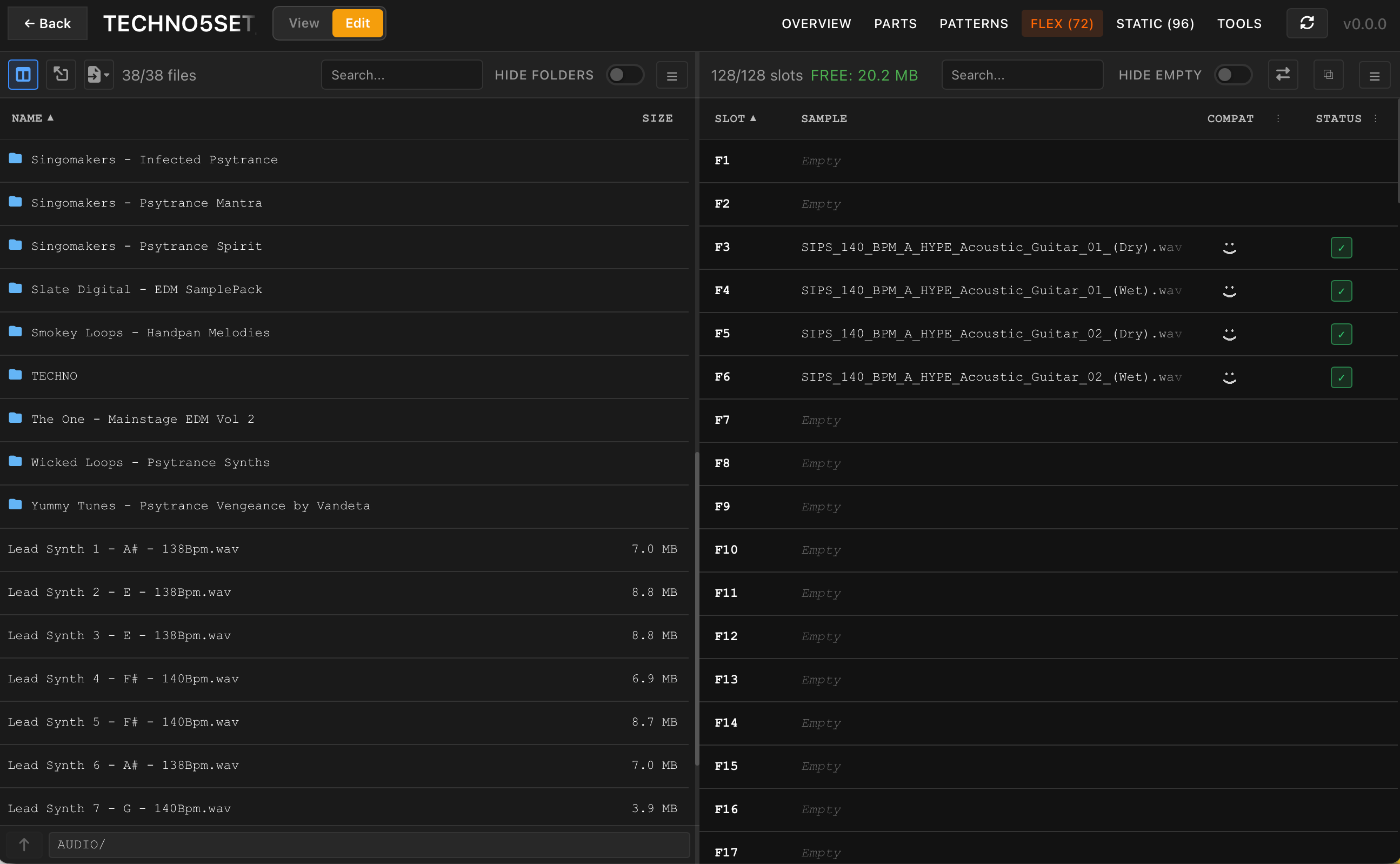
- Browse: Double-click a folder to enter it. The bottom path row shows the current path, a Reset to AUDIO directory button to jump straight back to the pool root, and the up (↑) button to go back one level at a time.
- Search recursively: Type in the search box to match files and folders in the current directory and all of its subfolders. A small spinner shows up while search is in progress. Clear the box to return to the plain directory listing.
- Full path on hover: Hover any item to see its path relative to the pool root (e.g.
AUDIO/Drums/kick.wav). - Location is remembered: The pane and the full Audio Pool page share the directory you are browsing, so opening one from the other keeps your place.
- Import into the pool: Click the Import dropdown button to import and convert files or directories to Audio Pool on the fly Files… or a whole Folder… (recursive) into the directory you are browsing.
- Check compatibility: The Compat column shows the Octatrack face icons for each pool file. Right-click an incompatible file and choose Convert to Octatrack format to fix it in place - slot references across the Set's projects are updated automatically (after a backup). See Fixing Incompatible Files.
- See this project's own usage: The Usage column shows the same blue ✓ N / gray ○ N badges as the Audio Pool page, but scoped to this project only - hover the column header for a reminder of that. Open the full Audio Pool page instead for a Set-wide view of who else uses a file.
- Rename an audio file: Right-click it and choose "Rename...". Sample slots pointing at it are automatically updated across every project of the Set (after a backup).
- Open the full page: Click the second top left icon to nevigate to the complete Audio Pool page of current Set. Once there, click the Back to project button (top left corner) to go back to the project you came from.


Assigning samples to slots
Samples can be assigned to slots in several ways while in Edit mode:
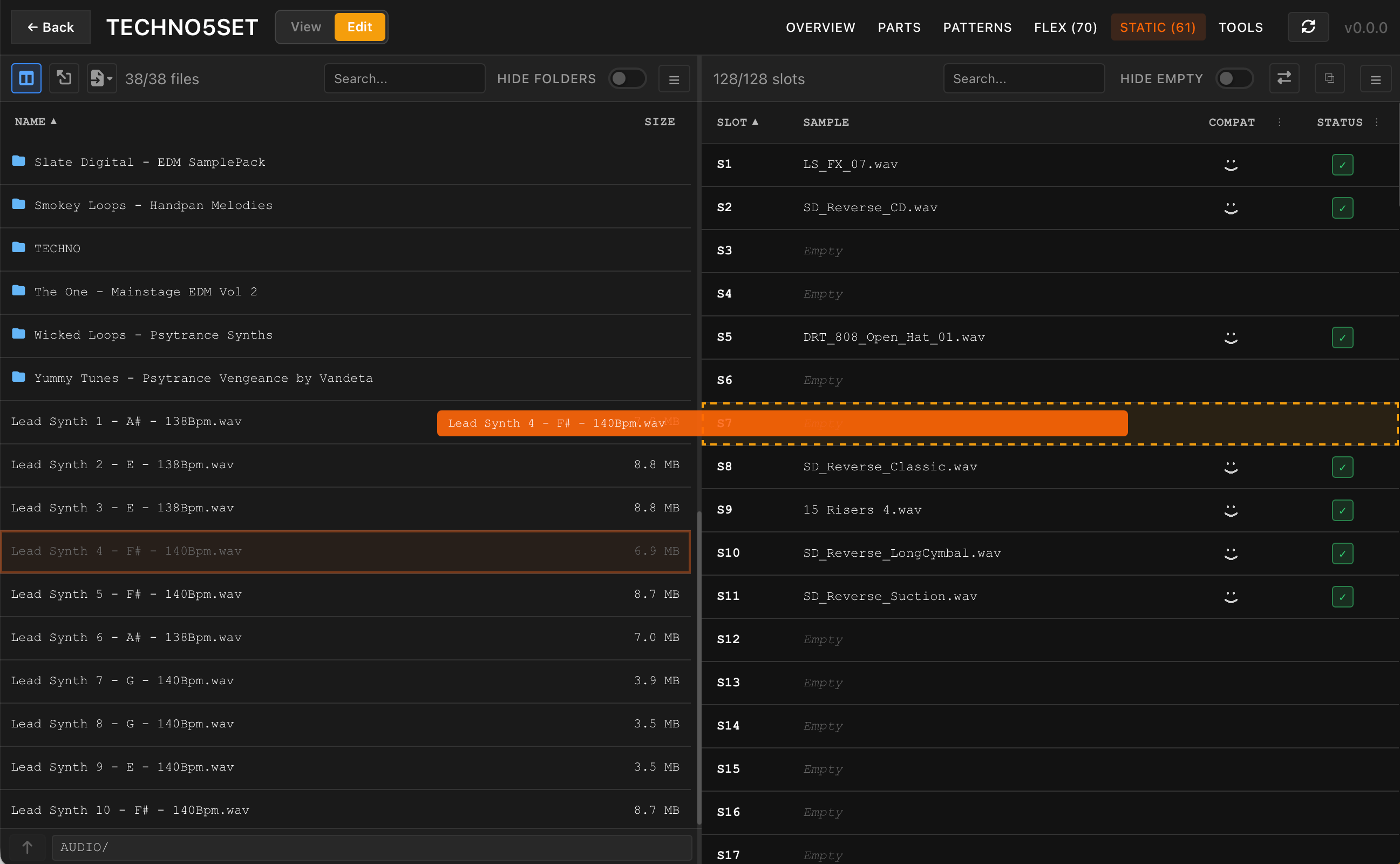
- Drag from the Audio Pool pane: Drag one or more files onto a slot row. The drop target highlights while you hover. Selecting several files (or dragging a whole folder) fills consecutive empty slots starting at the drop target.
- Drag from your computer: Drag audio files or folders directly from OS file manager onto a slot. They are copied into project's directory (and automatically converted to Octatrack-supported format if needed) before being assigned.
- Pool item right-click: Right-click a file in the pane for Assign to first empty slot, or - when a slot is selected - Assign to selected slot.
- Slot right-click: Right-click a slot for Import audio file(s) from system or Import audio directory from system to bring files in from disk and assign them starting at selected slot.
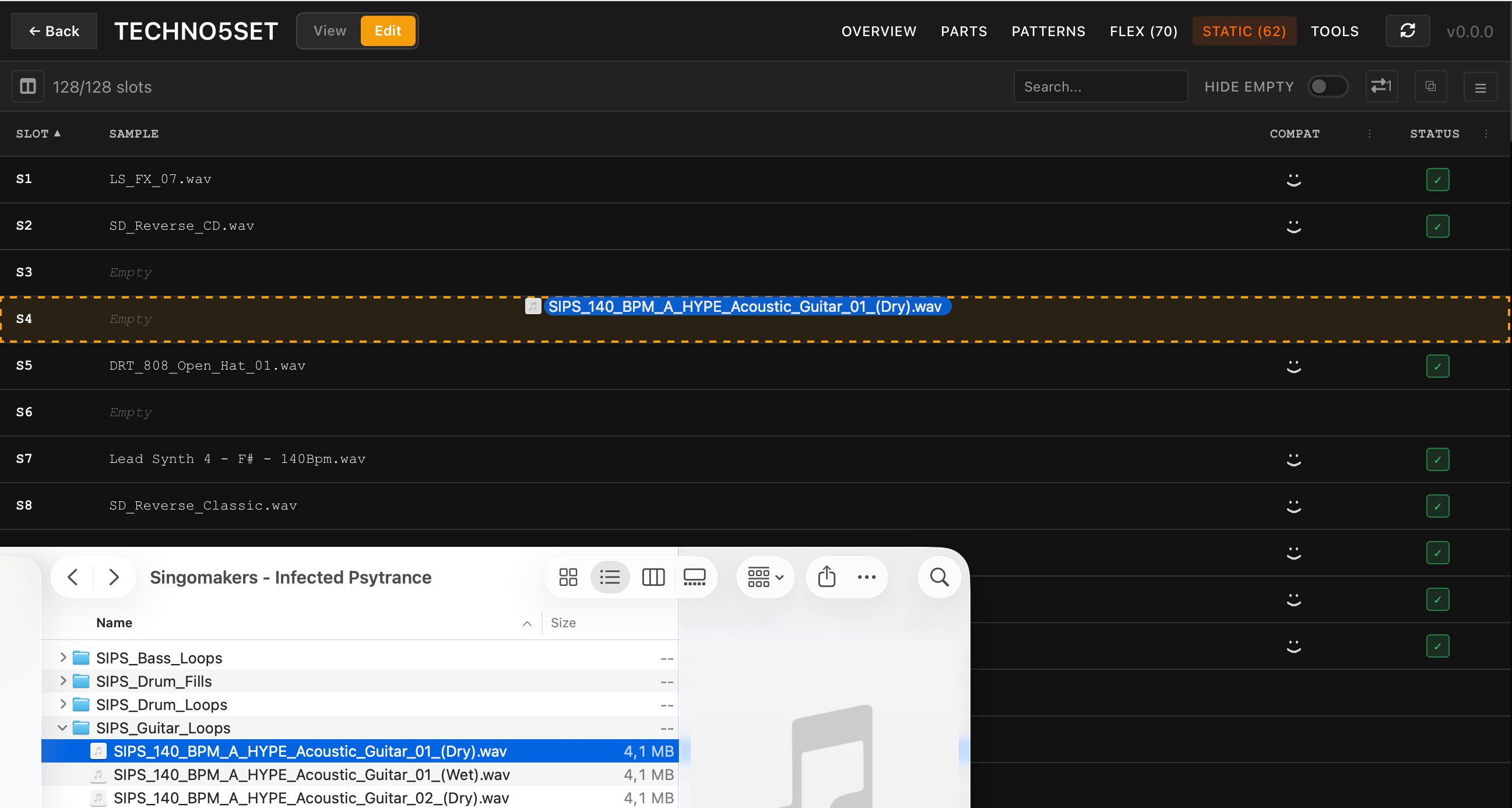
A Transfers panel tracks the progress of these copies and conversions, similar to the Progress Tracking pane on the Audio Pool page.


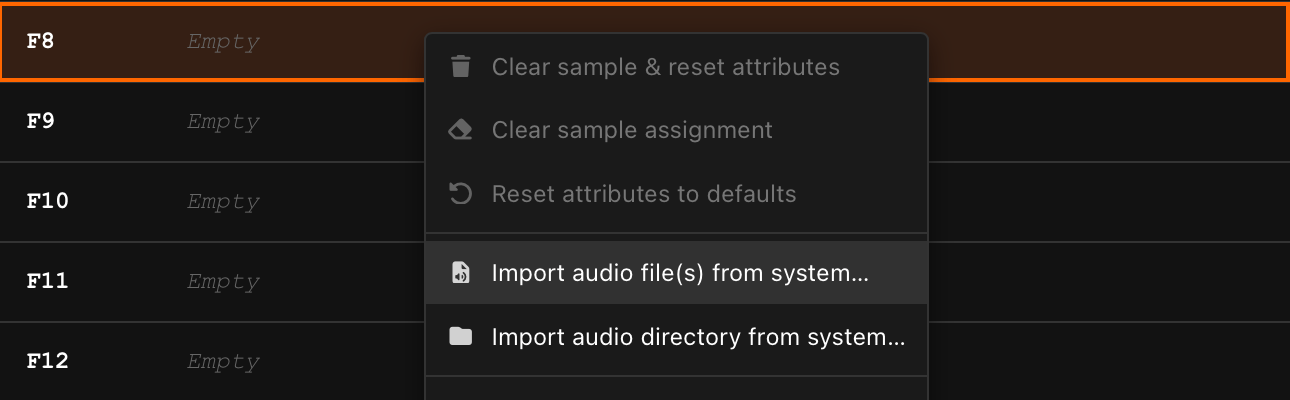
A sample assigned to an empty slot will take on default attribute values (gain, timestretch, trig quantization, loop mode and trim length). However, assigning a sample onto a filled slot only swaps the sample path and keep any existing attributes.
Managing existing assignments
Right-click to any slot (in Edit mode) for operations:
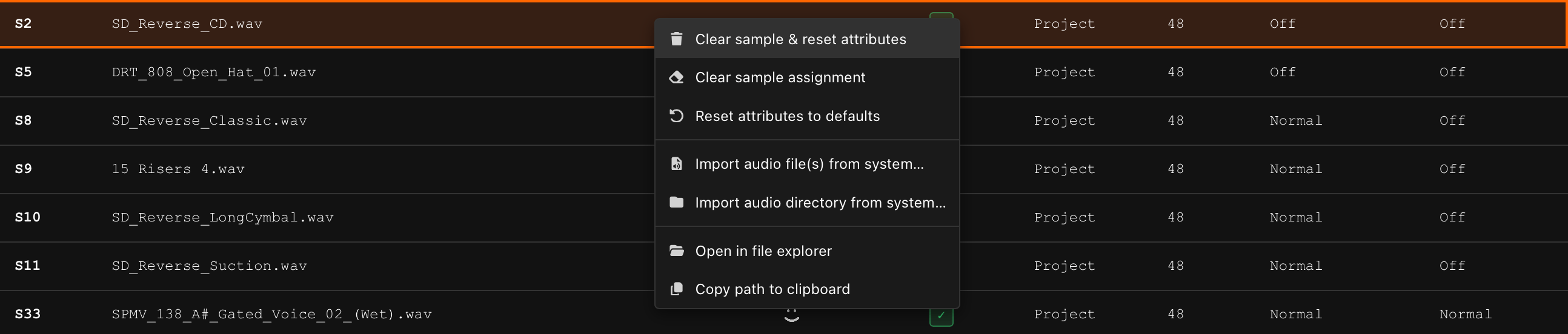
- Clear sample & reset attributes - same result as "Clear" operation on the Octatrack.
- Clear sample assignment - removes the sample but keeps slot's attributes.
- Reset attributes to defaults - restores attributes to default values while keeping the sample.
- Convert to Octatrack format - only enabled for a slot whose file exists and isn't already compatible; converts that one file in place (after a backup) without leaving the Sample Slots tab. See Fixing Incompatible Project Samples below.
Multiple Sample Slots can be selected at once to perform these operations using:
- Shift-click to select a range.
- Ctrl/Cmd-click to slect slots ndividual.
If the sample's audio file has a sibling .ot settings file, it will be backed-up to project's backups/ folder before being cleared.
Pressing keyboard Delete (or Backspace) clears the sample from any slot that has one, or resets attributes on a slot that is already empty - so pressing it twice on the same slot first clears the sample, then resets its attributes (same result as "Clear sample & reset attributes").
Three more operations can be found when right-clicking on Sample Slots, available in View mode too:
- Play - plays the slot's sample (same as double-clicking the slot).
- Open in file explorer - reveals the slot's sample (or a pool item) in your OS file manager.
- Copy path to clipboard - copies the absolute path of the slot's sample or a pool item.
Fixing Incompatible Project Samples
Each Flex/Static tab's toolbar shows a health glyph next to the slot count (hidden while the Audio Pool pane is open): an orange badge with a wrench icon and the number of slots referencing an audio file the Octatrack can't play, or a green check when every referenced file is compatible. Click it - or select Fix Project Samples from the Tools tab operation dropdown - to fix every incompatible file this project touches in one pass. To fix a single slot without leaving the tab, right-click it (in Edit mode) and choose Convert to Octatrack format - see Managing existing assignments above.
See Fix Incompatible Samples for the full walkthrough of both tools.
How Sample Settings Are Stored
The Octatrack stores Audio Editor (AED) settings for each sample slot across multiple files:
| Data | File | Format |
|---|---|---|
| Gain, BPM, loop mode, timestretch, trig quantization | project.work / project.strd | Text (per-slot [SAMPLE] blocks) |
| Trim points, loop points, slices | markers.work / markers.strd | Binary (per-slot entries) |
These files live inside the project directory and are always used by the Octatrack when loading a project.
About .ot Files
.ot files are optional sidecar files created explicitly by the user on the Octatrack hardware via the Audio Editor's FILE menu (Save Sample Settings, Save Sample Copy, or Save and Assign Sample). They bundle both attributes and markers into a single file alongside the audio file.
.ot files are only recognized by the Octatrack when located inside a project directory, next to their audio file. The Octatrack ignores .ot files placed in the Audio Pool (AUDIO/ folder) or in other projects' directories. Each project maintains its own independent settings in project.work and markers.work.